Archive for the ‘General’ Category

ChurpChurp: Nuffnang’s new Twitter offering

I’ve written about Nuffnang in the past, but today, I will focus on their new service ChurpChurp. This is Nuffnang’s latest foray into the advertising space – they’re into Twitter advertising. All Singapore and Malaysian Twitter users, this is something you should read about and understand.

This isn’t new

Twitter advertising has been around for about a year, with the first service that launched, being Magpie. This is similar to what ChurpChurp is – it identifies campaigns, matches them, and will then automatically tweet them for you (visually, how it works).

Magpie allows you to pre-approve all magpie-tweets before it goes out there an automatically posts them. Its not clear if this is just an option or something that happens all the time – auto-posting at random seems more interesting eh?

Magpie has a tweet average – once every ten tweets – by default. You can change the ratio (to once every 200 tweets too, it seems). Magpie supports disclosure, via a customised disclaimer, so you can have a hashtag to say it is sponsored. You can read this and more in their FAQ.

Disclosure is encouraged even via IZEA (the people that mass marketed sponsored conversations). They also have Sponsored Tweets, a yet to be launched service.

And in quick Googling, I also found RevTwt.

ChurpChurp

Register Twitter « ChurpChurp A quick view of ChurpChurp, without signing up (the last thing I want is my followers to be spammed). The registration page is most interesting, considering they use your age, race and religion potentially, for targeting purposes. They quite blatantly state: “Although optional, depending on the country you are in, we may use race and/or religion to target sponsored posts.”.

Register Twitter « ChurpChurp But Nuffnang has always shone because they err on the side of fun – they associate themselves with alcohol and possibly tobacco (I can’t remember a recent tobacco related campaign) related companies, and its no different on ChurpChurp. Imagine following funny-man Kenny Sia, and he tweets something like:

Just had a smoke. The menthol feels so good, you should definitely give it a try http://www.ciggies.com.my/ #churp2

But that’s a matter for another day. Alcohol related advertisements are rife in the Malaysian blogosphere, and I can almost guarantee that all readers aren’t of the legal drinking age.

How does ChurpChurp work? Two ways: automated insertions, or via customised insertions with just the appropriate keyword and link. The automated insertions might be easy to figure out, but the customised insertions with just a keyword, and potentially a different shortened URL (for tracking purposes, quite naturally)? Without disclosure, this could potentially be great for advertisers, and in fact, unsuspecting Twitter users will fall prey to ads too. I should make mention that ChurpChurp does support disclosure.

ChurpChurp has an FAQ for Twitterer’s as well as one for advertisers. There’s an interesting list of items that ChurpChurp will not advertise for.

ChurpChurp has defaults – up to 10 ads per week – but this can be customised. You can cash out after earning RM100/SGD100, and I wonder if the rates for the “chosen ones” go up higher enabling them to cash out faster? Or are “chosen ones” really chosen based on Twitter follower count? Remember, if chosen ones are based on follower count, it changes quite rapidly, as and when Twitter decides to clean out spam accounts.

Does this work?

Magpie has been around for a while and seems to not be going anywhere. In fact, I even follow one Magpie advertiser, @WoNoJo. He tells me that he’s just experimenting with Magpie, and I find his other tweets have more value, so I still listen to what he has to say.

That may seem like a blatant “OK” to this ChurpChurp idea, but it isn’t. Remember, you are enabling Churpers, and you can stop by just unfollowing them.

Duncan Riley over at The Inquisitr, has published a telling piece on how he used Magpie and what he thinks about it in: In-Stream Twitter Advertising: Does It Work?. All potential ChurpChurp advertisers should be reading this.

I’m following someone who’s Churp-polluting my stream. What can I do?

If you value his/her tweets, tell them via an @reply that you do not like it. Direct message them if they follow you.

Alternatively, you can always unfollow them.

However, if you feel strongly about this, feel free to drop a direct message to the @spam account on Twitter. Gareth tells me in a comment that its best to direct message the @spam account on Twitter, so as not to mistake your account as a spam account too.

I’m thinking of joining ChurpChurp, should I?

Well, quite simply, you should not. But the promise of earning money is there, right? Just ask yourself: do you want to alienate your followers?

Also, please look at Twitter’s terms of service – #8 states You must not create or submit unwanted email to any Twitter members (“Spam”)..

Anything else?

I invite you to share your comments about ChurpChurp in the comments section. On Twitter, it seemed like most people weren’t too thrilled with Nuffnang polluting the Twitterverse, but it was only a matter of time after they had polluted the blogosphere.

Update: Thanks to Gareth for telling me in comment #1 that its best to direct message and not @reply the spam account on Twitter.

Yasmin Ahmad at TEDxKL

Yasmin Ahmad passed away recently, and I guess I was lucky to hear her speak. Her inspiring talk was given at TEDxKualaLumpur, on 3rd June 2009 and in my books, was the best talk of TEDxKL.

There is supposed to be video, but that never made it online as of yet, so while this isn’t a transcript, these are excerpted from my notebook.

  • How do you choose an actor? charisma. You need to display charisma.
  • Learn to let go – “empty yourself”. The advice here is to create great stuff, then move back. Its the key to happiness. This is a common mantra in Zen Buddhism.
  • Observe.
  • Remove one’s arrogance, and once self importance. You’ll then be part of something larger.
  • “I don’t know anything about film making. I just empty myself.”

Her talk garnered many laughs from the crowd. She didn’t stick around for TEDxKL much, rushing on to her next gig, but I think her talk certainly moved people in the audience.

I haven’t had the chance to watch any of her movies yet (I was just a fan of her inter-racial 1Malaysia muhibbah styled-ads). Surprised I was that none of them made it to the Malaysian Film Festival held two years ago in Melbourne. They’re high on my to-buy-and-watch list now, so I do hope the local Speedy has her DVDs in stock.

Update: (30/07/2009) Her video from the talk has made it online!


The fracas

Dear Nasrul,

I’ve watched the vitriol on osdcmy-list, I’ve seen the attacks on Facebook, and on Twitter and I’ve read all the comments on the Open Malaysia blog, and I think its time I chime in.

Firstly, I need to ask: do you know much about open source? I would highly recommend you read The Open Source Definition.

Next, you’re talking about Facebook, which is a closed platform, which was launched at an open source conference. Why?

But more interestingly, you won RM2,000 for “porting” MediaWiki to run on the Windows, IIS, MSSQL Server, and PHP. For what it is worth, MediaWiki already runs on Windows, and works fine with IIS. So it seems that your largest task, was to port the SQL, to run not on two very capable open source databases, but to run on Microsoft SQL Server (a closed source database).

I read Final Day: MediaWiki – What I learn so far from LAMP2WIN and My Journey with glee.

So I decided to poke a little. You haven’t submitted any code upstream to MediaWiki. But what’s worse is, have you seen Bug#9767? The title of the bug is “Microsoft SQL Server/MSSQL support (tracking)”. It doesn’t take a genius to tell you what the patches in that bug do.

Yes, DJ Bauch added support to MSSQL, via ADODB (work started in 2007, and its been ready since April 30 2009). Something you won money for. But worse? “.. winners walked away with RM2,000 in cash, a MSC Malaysia Participation Certificate. They will also enjoy facilitated access to MSC Intensive Technoprenuer Programme and the eventual RM150,000 pre-seed fund.” (via the Malay Mail).

Now you’re able to access a lot more money, for work that you, yourself, did not do.

I think you should get off your high horse, understand a little more Netiquette, and behave. After all, Google will forever remember what you’ve said, and all the personal attacks against active participants in the open source community, which I’m certain can do you no favours.

Kind Regards,
Colin

Postcards, an iPhone app idea, and HazelMail

First birthday wishes A few months ago, I had this idea, that I shared with a few people, for a cool iPhone app. The idea was roughly:

Take a photo. Use said app. Add a message. Pick an address (preferably out of your Address Book). And have it mailed out, without you having to look for a post office, a postcard or a stamp. And never have to worry about charges — it’ll just be billed via your account on file, either via PayPal or direct credit card debit.

The problem with this business model is that:

  1. I need to work out printers – there must be local printers in various locations, typically of the destination.
  2. I need to work out how postal services work, in general, and what’s the most profit-friendly option

The margins, I figured, will be low. The application will either work via (roaming – one would assume) 3G/EDGE, or a common WiFi network, which you tend to get pretty much everywhere these days. WiFi should be preferred, since you don’t want to be slapped with a large roaming data bill. The Two Apostles

Anyway, I purchased the iPhone 3.0 SDK about a month back, and started hacking. Finding a name was going to be interesting, since apps like iPostCard, already existed. Ha! Names are so important, I think.

Today, I read about how to Turn your iPhone photos into postcards with HazelMail. HazelMail does exactly what I was planning to do. They’ve worked out all the business aspects, too, and charge your account with HazelBucks (so 1 postcard = USD$1 basically).

The only problem I can see with this whole idea (HazelMail’s and mine)? Stamp collectors. Some people love stamps from foreign lands, and that is part of the appeal, of receiving a postcard. However, I don’t know that many stamp collectors these days, and I do want to send postcards, so this was really, just trying to scratch an itch, and I’m glad that HazelMail has done so. Time to give it a try, and work on my next app idea ;)

Forced password changes

My employer has this odd policy where they force you to change your password, once every six months or so. Its annoying, because sometimes, you forget your password. Its inherently more insecure to write it down somewhere, isn’t it? Plus, you can’t reuse passwords.

However, my mail client always has my password. And therein comes, a useful Thunderbird add-on, called Password Exporter.

Now, I can see what my last known password was, and login when need be.

Nokia N97 – Quick Impressions II

This is part of an ongoing series on the Nokia N97 phone. Get started with Nokia N97 Quick Impressions and Quick Impressions II.

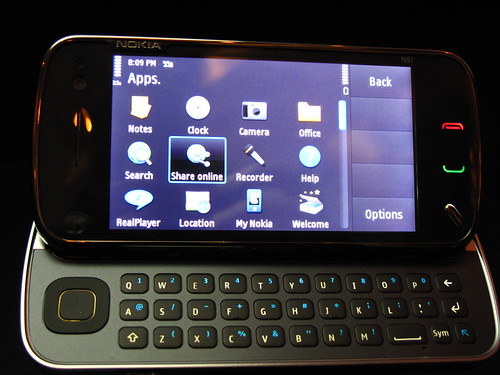
The Nokia N97

There were just some items that I neglected to cover in the first article on the Nokia N97 – Quick Impressions.

Last Friday, I was invited to the Nokia N97 launch party at Mandarin Oriental, thanks to Text100/Nokia. Amidst all the fanfare and meeting friends, I decided to take a closer look at the N97 again, this time armed with my Kodak Zi6. As a consequence, I have two somewhat blurry videos (sorry, the phones were bolted on to devices that prevented theft, making my job a lot harder), one demoing gravity and the touch screen features, and another taking a look around the phone showing off things like the keyguard, and so on. There are a bevy of questions and comments there on YouTube, which I wish were just integrated into my blog, but I’m surprised at the amount of people searching for N97 videos :-)

If you’re interested in the party, which was excellent, BTW, don’t hesitate to read Yoon Kit’s entry, or even Bernard’s entry.

First up, the phone costs RM2,480. That is the suggested retail price, and its not much different from Singapore, a marked improvement from what the N96 or the E90 costs.

The phone comes with a stylus. There were none around that day, so using your fingers makes the most sense. Who wants to use a stylus you ask? Nokia is making it easy for input of Chinese characters. I however do think that its silly to have to place the stylus in the case (you’re bound to lose it). But I’ve never seen the case, so I don’t know if its something I would use (I normally never use any cases for any of my phones).

Comments in the videos above, as well as from using it, will show that the touchscreen isn’t as responsive as what you’d find on the iPhone. I wrote this when I reviewed the Nokia 5800:

Its a touch screen, and you’re expected to be able to use it with one hand, and you can use your fingers. However, its not so fancy – once you’ve used the iPod Touch or the iPhone, you’ll slowly realise that the touch screen isn’t all that.

Why? The touch screen is resistive, not capacitive, which means that a “click” is only registered when two thin layers of the screen get pushed together under the pressure from my finger (or stylus). AFAIK, the iPhone uses something called “projected capacitive” screens, and you don’t need actual contact (and it works well for multi-touch).

It still applies, with the Nokia N97. Sigh.

From the event itself, some other interesting bits:

  • It seems that 40% of Internet use is mobile. I’ve not seen this anywhere else, but if this is the case, everyone better be designing for mobile use.
  • Its interesting to see that the Ovi Store is a Social AppStore. What does that mean? It means you get regional differentiation. This can mean two things: some apps may not be available in certain regions (say games in China), or it could also mean that you’ll see relevant apps for the area you’re in… so if you’re in KL and fly to London, you’ll see more London specific apps. The social bit? Well, you can see what your friends are using, and this can affect ranking. I presume all this means you need to have an Ovi.com account, and add friends there, so what Nokia is effectively trying to do is create a social network of Ovi users. I don’t like this idea, because I feel there are already too many social networks out there, and studies have shown that you can be active on at most, 3 social networks at any given time.
  • There was a very interesting machinama styled ad, created by Text100 Malaysia, which I hope Erna @Mahyuni and @DavidLian get placed online, ASAP. I think its better than the normal Nokia N97 ad ;)
  • Yoon Kit asked on Twitter if the browser is HTML 5 compliant and if it’ll play OGG. I immediately replied that it isn’t, and later on during the briefing, he asked, and was told “they’ll get back to him”. Maybe it’ll come as an OTA update… But I don’t think open standards are big on everyone’s mind. Look at CD players in cars – they play MP3 and WMA. I’ve yet to find one that plays OGGs.
  • Ditesh asked by proxy if there will be SIP, with the SPEEX codec, and I also immediately replied that there was no SIP. However, upon asking, later at the briefing, we were told SIP will come as an OTA update. I’m weary as to when we’ll see this… but it also seems that you’ll get Skype built-in.
  • We were told that many in East Malaysia and other rural parts of the world, get their first experience of the Internet on their mobile phones. I somehow don’t believe that many in East Malaysia will get their first Internet experience via a RM2,500 phone. What do you think?

Yoon Kit and I chatted about Blackberry Connect, and I told him a lot of this is provided via Nokia Messaging (which is currently in beta, and free at the moment), which in a device itself, premiered in the Nokia E75 (its not apparent its in the N97 yet – probably a firmware update will help soon). He lamented that calendar and contact support is required, and I mentioned that webcal support isn’t available, per se, but if you have an Ovi.com account, you have calendar and contact syncing available… But the calendar, IMHO is primitive to Google Calendar’s sync/publish features, and I’ve never used a BlackBerry device, so I can’t realistically comment.

The camera on the device is pretty good, for a phone camera. A couple weeks back, I used the camera and the Facebook integration, to create an album (Testing the n97). Facebook is notorious for not keeping the hi-res images, so grab them from posterous or even flickr.

If I get my hands on the device, you can be ensured more tips, tricks, and usage information. More importantly, I’m going to focus on WRT widget development, the Ovi Store, and lots more. Mobile app development seems hot :-)

BTW, on Saturday 13 June 2009, selected Nokia stores will sell the device in Malaysia, at what is probably the SRP of RM2,480.


i