Archive for the ‘General’ Category

OpenOffice.org 2.3 exports to MediaWiki

One interesting feature of OpenOffice.org 2.3 is its Export to MediaWiki functionality. Its simply, a File -> Export, give it a filename, and select MediaWiki. Automatically, you have a .txt file, that you can paste directly into MediaWiki. There, an offline editor for MediaWiki!

Sadly, this isn’t as well integrated as I’d like. You can’t actually edit an existing MediaWiki document in OpenOffice.org. And it has some limitations, so I suggest taking a read of the Odt2Wiki page (also, the Features page). Like adding images manually, is a bit of a quirk.

However, as someone that writes a lot in a Wiki, I’m pleased to say that I can now do this easily in OOo Writer, and will only have to resort to the built-in Wiki editor, when actually, editing content. Well, here’s to open standards and XSLT transformations.

In a related matter, of editing Wikis, its good to know that Firefox 2 has built-in spell-checking in text area fields, so there’s now no reason to have badly spelt Wiki documents.

Technorati Tags: , , , , ,

Why I liked Ubuntu (and my thoughts on Gutsy Werewolf, aka Fedora 8)

One of the reasons I like Ubuntu is because they have a really swanky commercial repository, and they make it easy for me to get some commercial software, without pulling an RMS-styled “Freedom is a feature” on me. Don’t get me wrong, I still love Fedora with all my heart, but when you get out of the distribution business per se, you feel that you might just want your primary machine to “Just Work”(tm). And long gone are the days where I carry 2-3 laptops when I travel – I just aim for one (I have lots of photo gear to worry about, instead).

The Feisty Fawn, was a pretty good Ubuntu release. That is, I got my commercial software fix – Sun’s JDK (moot these days, hello IcedTea in Fedora, for instance), VMWare Server (its free, kind of useful for running other distributions), and even Opera (sometimes I’m bored with Firefox, Galeon, Epiphany, I need to test things in another browser).

When Gutsy Gibbon got released, I couldn’t wait to update to the next, best thing. You expect things to move forward, never regress right?

Well, Sun’s software still works. As does Opera. But VMWare, has since, stopped working. Kernel 2.6.22-14 does not come with appropriate VMWare modules. Yes, that means, there’s no vmmon or vmnet loaded (or even, loadable, to be exact). Effectively, they’ve broken VMWare. I wondered why, so I hopped on to a package search, only to find out that VMWare has been removed from the commercial repository. No real explanation that I can find as to why it doesn’t exist.

So, my next option is to maybe build-my-own-package. There’s a guide titled VMWare in Ubuntu Gutsy – Kernel 2.6.22 that might be a good read for those that want to use this. Then I recall why I moved to using Ubuntu daily – I did it to get away from the frustration of having to build things myself. I did it, for the “Just Works”(tm) experience.

My options are to move to using some free software, quite obviously. There’s KVM, Xen, or even VirtualBox. Hey wait a minute, I can get all this in Fedora 8 too, can’t I?

The Gutsy Gibbon was supposed to come with a rocking new tool, displayconfig-gtk (i.e. System -> Administration -> Screen and Graphics). Unfortunately, it is broken beyond all thought. Then I remember an old friend, system-config-display, from Fedora – at least it works, and it has been around for ages (since what, Red Hat 8?). displayconfig-gtk is supposed to give me all the wonderful hotplug goodness of an external display, but it doesn’t. I can manually push xrandr to at least mirror my display (Intel chipset, might I add), which I’m sure I can also do in Fedora 8.

So I’ve come to the realisation that things are broken, and I’m going to have to do things manually, if I want them to work. This is irrespective of if I run Ubuntu or Fedora. Being just an “end user” is hard, to almost impossible.

My needs-to-work-list:

  • sleep/resume – this can also be kernel version dependant, Ubuntu has the advantage for a less aggressive release policy, but it seems Fedora is catching up with wanting to ensure laptop stuff, just works
  • wifi – ipw3945d is my poison, and it seems that both Fedora and Ubuntu have this working out of the box (a stark improvement to previous Fedora’s where you had to get the firmware yourself). Of course, repeated sleep/resumes tend to make WiFi die, and that just annoys me
  • video out – this is hacky at best, Ubuntu works if I tweak things manually, I wonder if Fedora 8 will have this any better. Nonetheless, xrandr should come to my rescue
  • sound – well, my laptop is my primary music listening device as well as video watching device. Ubuntu and Fedora should have this working just fine
  • codecs – I need to watch DivX, play MP3s, and so on. Ubuntu provides this via Medibuntu and Fedora via Livna
  • media keys – Ubuntu and Fedora should have this working fine, and GNOME in both environments is highly friendly
  • virtualization – I don’t care if I end up using KVM (which is looking like what I’m going for), or Xen (no ACPI, and obviously can’t sleep/resume), but I think I’ve had it with VMWare unless they have sensible packages. I have useless VMs sitting on my laptop now.
  • fully 64-bit OS – I plan on moving on from 2GB of RAM to 4GB of RAM (its kind of cheap nowadays), and want a fully 64-bit OS. Ubuntu works, sure, but I have to have ugly chroot hacks for a 32-bit environment. Fedora just works, some say because RPM is broken but I say, if that’s the case, its broken in a good way. Mixture of 32/64-bit rpms, are sweet
  • Skype, GizmoProject – closed source, install your own, works on Ubuntu and Fedora

My “it’ll be nice if it worked” list:

  • compiz effects – Doesn’t seem to work on Ubuntu, I wonder if Fedora will have it any better
  • hibernate – not quite suspend/resume, but it can be handy to have around
  • sd/mmc/memory stick card reader – Doesn’t seem to work on Ubuntu (Feisty, last I tried it)
  • tv out – Never tried, but if video out is this bad, I doubt s-video is any better

I take it that’s enough ranting for today. Congratulations to the Fedora Project for releasing Fedora 8 today. I think Werewolf will be a gutsy release alright.

And a happy Diwali/Deepavali to all Hindus. As an aside, the number 8 is interesting – in Chinese, it loosely translates to being lucky. And November 8 2007 seems to be the “festival of light”. The only way it could’ve been any more numerically lucky is if it were released on 08-08-2008 (a day for a lot of weddings, I assume).

I seem to enjoy asides today, so here’s another. I ran dict gutsy, and it has some interesting definitions:

  gutsy \gutsy\ adj.
     1. marked by courage and determination in the face of
        difficulties or danger.
       Syn: courageous, plucky.
      2. rough or plain; not sophisticated or refined; earthy.
        Opposite of {sophisticated}, or {refined}.
       Syn: earthy, lusty, robust.

I wonder if, definition-wise, Gutsy Werewolf is #1 and the Gutsy Gibbon is #2?

Technorati Tags: , , , , , , , , ,

Quick notes on Malaysia

Some quick, quick notes with regards to Malaysia.

Twitter in Malaysia
It seems that the Malaysians have done it again! They’ve copied Twitter, and they have PacMee. The model requires you to have a mobile phone, so it is obviously more expensive than Twitter. But they’re probably aiming to go on popularity – they’ve got “famous” bloggers like cheesie, nicolekiss and kennysia. The first two are complete camwhores (which is why I have their feeds in Google Reader, so when I’m bored on the train, I get entertained), and they don’t exactly look loathsome, so probably have a good readership. What I found interesting with PacMee is that they’re doing and interesting contest – The Most Happening Babes on Friendster. It just goes to show that Friendster is still very much alive (oh, don’t talk about OpenSocial, just yet), and if you find a “babe”, you might be inclined to follow her on PacMee. All in all, making Maxis/Hotlink a pretty penny. They also have an API!

Bahasa Malaysia
My search-fu doesn’t stretch to show me much information about this archaic organisation, the Overseas Umno Club Alumni. Is it the fact that they’re Umno folk that are overseas? Should they then stop butting into Malaysian issues? These folk seem to think Bahasa Melayu is a better name for the national language. However, the Information Minister Datuk Zainuddin Maidin, has said “the use of the term Bahasa Malaysia was a more friendly and effective approach in the effort to unite Malaysians.” A name of a language to unite Malaysians? Surely they assume Malaysians in general are morons, right?

Temple Demolition
When the Taliban destroyed ancient Buddhist sculptures in Afghanistan, it made world news. In Malaysia, the governmental agencies decided it was okay to wipe out 60 years of history for a Hindu temple in Kampung Rimba Jaya, not much was said and done. In addition, assaulting the Chief Priest, seemed like a good idea. All before the Hindu festival of Diwali/Deepavali, which ironically, happens today. What is Malaysia coming to? A disgusting place lacking religious freedoms? Let it be my next pet project to document these beautiful structures, lest they disappear.

Via Shashi Tharoor, he quotes a New York Times editorial piece by Tina Rosenberg: “Mobs often seek to destroy religious & ethnic sites, both to intimidate the people who hold them sacred and to send the message ‘you do not belong here.'” 50 years of independence?

Technorati Tags: , , , , , , , , , ,

RAW Management and Conversion in Linux

Today, I was playing around with Linux, and RAW management. Not wanting to carry a laptop just for photo editing (i.e. I plan on travel without my MacBook Pro, and beautiful Lightroom, Aperture, iView Media Pro [okay, Microsoft Expression Media now], and Photoshop CS2), I figured I should make Linux up to scratch.

My favourite photo browser, is GQview. Its not standard software any longer, but its pretty old, and it works fairly well. It however, doesn’t support RAW. Today I discovered f-spot (ok, I discovered it ages ago, but I didn’t like its iPhoto-ness, where it wants to import stuff for you). Never fear, that’s what

    f-spot --view <path>

is for. Shortcut wise, its a little different, so I just use the up/down arrow keys to browse.

Now to convert the RAW files to JPGs, with preservation of EXIF data. I played around with the commands manually after reading the man page for dcraw, and figured there must be a better way. So I hopped on over to Yahoo!, did a little search, and came up with Jamie Zawinski’s mvpix. After changing the script a tad bit to suit my environment, I have images! RAW, JPEG, and copies of the JPEGs in an EDIT folder. mvpix also works on OS X.

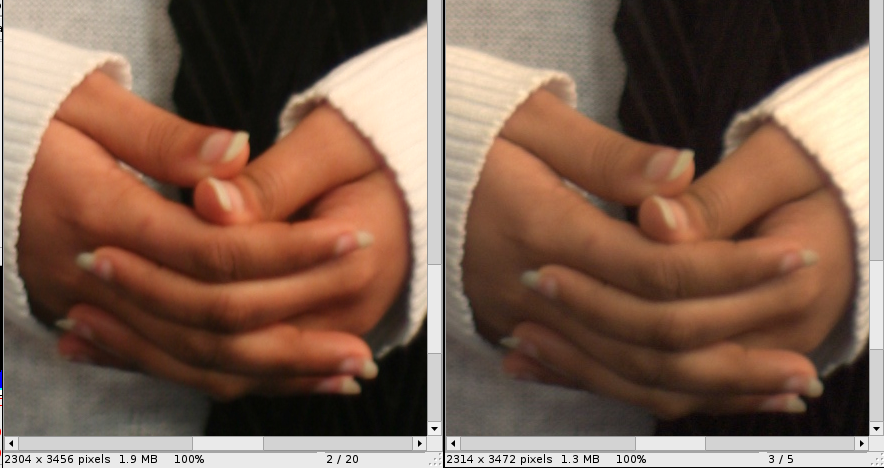
The options being passed to dcraw seem to be simple: -w for using camera supplied white balance, -t 0 for no tilting, and -c for writing decoded images to stdout. Its passed to cjpeg, and run at 95% quality. However, the images seem to be a tad different, and I have no idea why.


On left, is when the camera was shooting in RAW+JPEG, and on right is the JPEG generated from the RAW file (click for larger image). These are 100% zooms.

The colour differences befuddles me. Why does the camera come out with “brighter” RAW, and dcraw come up with paler tones?


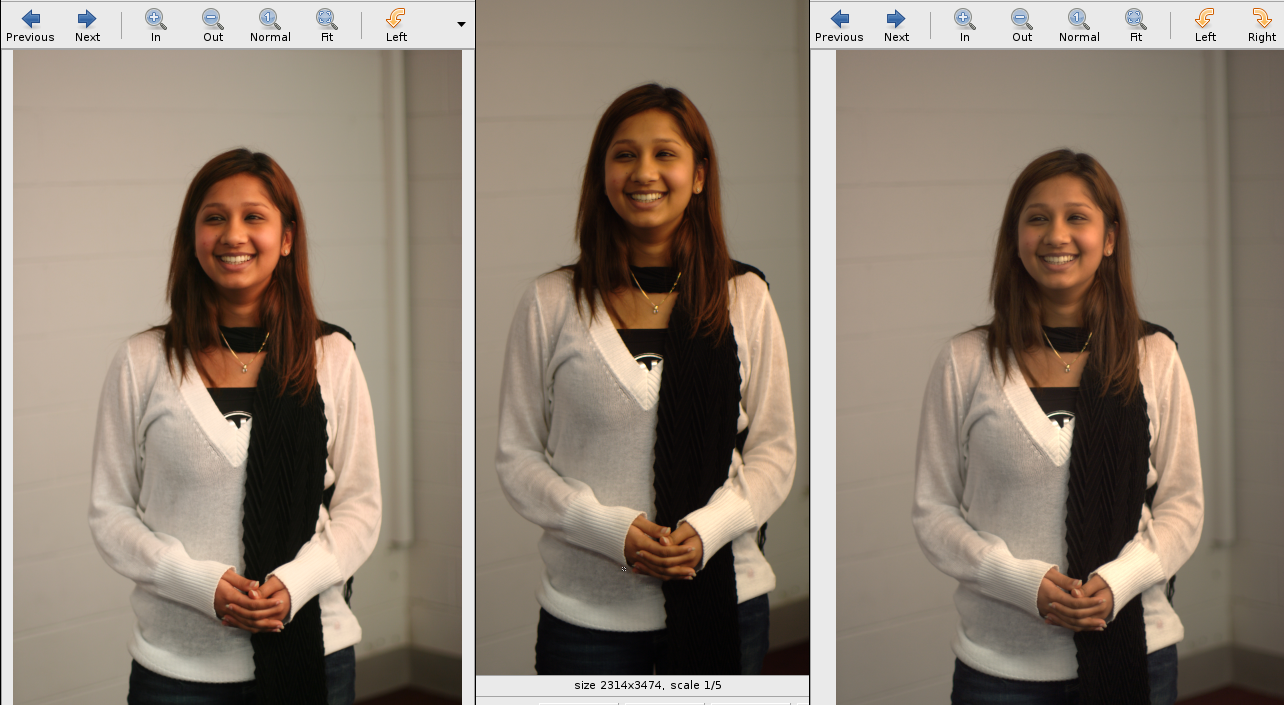
On left, is what the in-camera JPEG gives, when you’re shooting in RAW+JPEG, in the middle is what UFRaw sees from the RAW file, and on the right is what the converted JPEG looks like, after being parsed through dcraw+cjpeg (click for larger image).

What gives? Are there better options in dcraw to give me an as-close-to-in-camera JPEG experience? Are the converted images better/more true coloured? I’m not sure which to pick, and I’m not sure what’s the correct setting, to be honest.

Now about the photos. Apologies to the girl pictured here, all I know is that she’s probably a student at the Caulfield Campus of Monash University (so no, I don’t know her name). She was randomly picked for some quick studio photos, which was really just a bunch of us playing with a few studio strobes, and having the power of wireless triggers. These photos all rolled off an EOS 350D digital back, with a 50mm/1.4 lens attached to it, shot at f/1.6, at 1/25s. Sure, this should have really been made at f8, but there was no time to coax the girl.

Technorati Tags: , , , , , , , , ,

CLOSED CURRENTRELEASE or how Apple deals with bugs

In the open source world, its quite common to see bug statuses as CLOSED, RAWHIDE (on Fedora, to tell you its in the current development version). Sometimes, you also see CLOSED, CURRENTRELEASE (which usually implies that they’ve bumped the minor version number up, and have pushed the update to you, via yum/up2date). Sometimes, CURRENTRELEASE is used to define ERRATA (though with a fast moving project like Fedora, you tend not to really have errata releases – this is more RHEL-space).

Bottom-line: I get my bug fixes, for free.

Over a year ago, I reported a bug to Apple about an iChat error I was getting, that gave me a Feedbag Error 10. I’ve definitely got numerous other radar entries, but no point linking to them, since there’s no public bug tracker. Today, Apple basically closed the bug as CURRENTRELEASE (or really, what they meant to do was close it as NEXTRELEASE). And as a consequence, they’ve decided that charging me AUD$158 would be the most appropriate course of action. They’ve told me to upgrade to Leopard!

I won’t paste the message here, because that’s apparently under NDA (how can you really NDA a bug report? I’ve seen radar numbers being posted on the Web before… and its not like my bug report, which is my own, isn’t public – maybe if there were actually responses from Apple engineers, then it’d become private). But to paraphrase, Apple Engineering thinks my bug has been fixed in the commercially available Leopard, and upon installing the new software, my bug will most likely be fixed.

Bottom-line: I have to become $158 poorer. Or renew my ADC membership, and wait patiently for the mail (really, why do they even bother sending updates on CD/DVD monthly, when pretty much every Mac developer is connected to the Internet? Waste of resources Apple, how non-green of you, worse, thinking that Al Gore won a Nobel Prize for all his work. The only good thing about renewing an ADC membership is possibly the free t-shirt, the occasional pushes of OS X on DVD, and the hardware discount, if utilised).

Technorati Tags: , , , , , , ,

books, october 2007

It’s been a while since I did a book’s I’ve read update. And really, the reason I do it is to ensure I don’t go out and buy doubles, because I do have a pile of “books I want to read”. Maybe I should use LibraryThing (USD$25, lifetime) or AllConsuming (free, integrates with 43things, etc.). But its nothing like walking into a physical bookstore, and whipping out your phone, and hitting the blog, to do a search ;)

  • The Google Story – David A. Vise – an amazing read, about a company that started in a university. Lots of gems, not that I didn’t already know most of them, but still, useful. Explaining 20% time, Google hacks, even a recipe from the chef, just gives you a good idea of the whole Google family.
  • NLP (Neuro Linguistic Programming)… The new art and science of getting what you want – Dr. Harry Alder – I liked this book, but I felt it was filled with too much theory. It isn’t until past halfway through that you learn to control the situation. I think it could have focused on a more howto-styled approach, to ensure that the reader finds no hassle controlling their next subject!
  • The Tipping Point – Malcolm Gladwell – great book, I only wish I’d read it earlier. Crossing the threshold is most interesting, differentiating between connectors/mavens/salesmen, how exceptional people start epidemics, stickyness factors, and so much more. I’d encourage anyone attempting to build up a community or work with an OSS community to read this.
  • The Undercover Economist – Tim Harford – I love reading about economics, and this book continued fuelling my interest. I think to technology folk, what’s most interesting is how Tim put in words, how most technology nowadays is so easy to create/replicate, and since there’s a lack of scarcity, these companies move/fold quickly. There’s more to the book than just those three pages, I’d recommend this highly (in fact, I got a copy for Giuseppe in Heidelberg for just this purpose – he book-swapped with me, I got the God Delusion, which I haven’t read yet).
  • Founders At Work – Jessica Livingston – Excellent read. About companies you use currently. Or used (there have been some deaths, or sites that lost out the scarcity war). A must read, because Jessica gets into the founders’ heads.
  • Bella Tuscany – Frances Mayes – wanting to complete my reading interest in all things Frances Mayes, I just had to read this. And its only made me want to go to Tuscany a lot more (from what I hear, its filled with foreign tourists and not Italians nowadays, because of her books – I’m told Sardinia might be a better bet :P)
  • The Year of Yes – Maria Headley – A girl from a small town in the US, moves to New York, and says “yes” to all manner of men that ask her out on dates. For a whole year. She found a partner in the end, which I found kinda ironic (but I guess this is what fairytales are made of). It left me asking the question: why would a 21-year old girl do this? Was the sole purpose to write about it?
  • English as a Second F*cking Language – Sterling Johnson – While English is my first language (and realistically, my only language that I can read/write/converse fluently in), this book was too hard to not pick up. Saw this in a bookstore in Germany, and boy is it funny. Teaches you all the stuff you really shouldn’t use, but hey, its humorous!

i